


As a designer working with Adobe Illustrator, you're likely familiar with the powerful tools and features that enable you to create intricate and precise designs. One such feature is the Offset Path, which allows you to create copies of a path at a specified distance from the original. In this comprehensive tutorial, we'll delve into the details of Offset Path, exploring its options, advantages, and disadvantages, as well as providing step-by-step tutorials to help you master this advanced technique.

The Offset Path feature in Adobe Illustrator enables you to create a new path that is a copy of the original path, but offset by a specified distance. This feature is particularly useful when creating designs that require precise control over the spacing and positioning of paths.
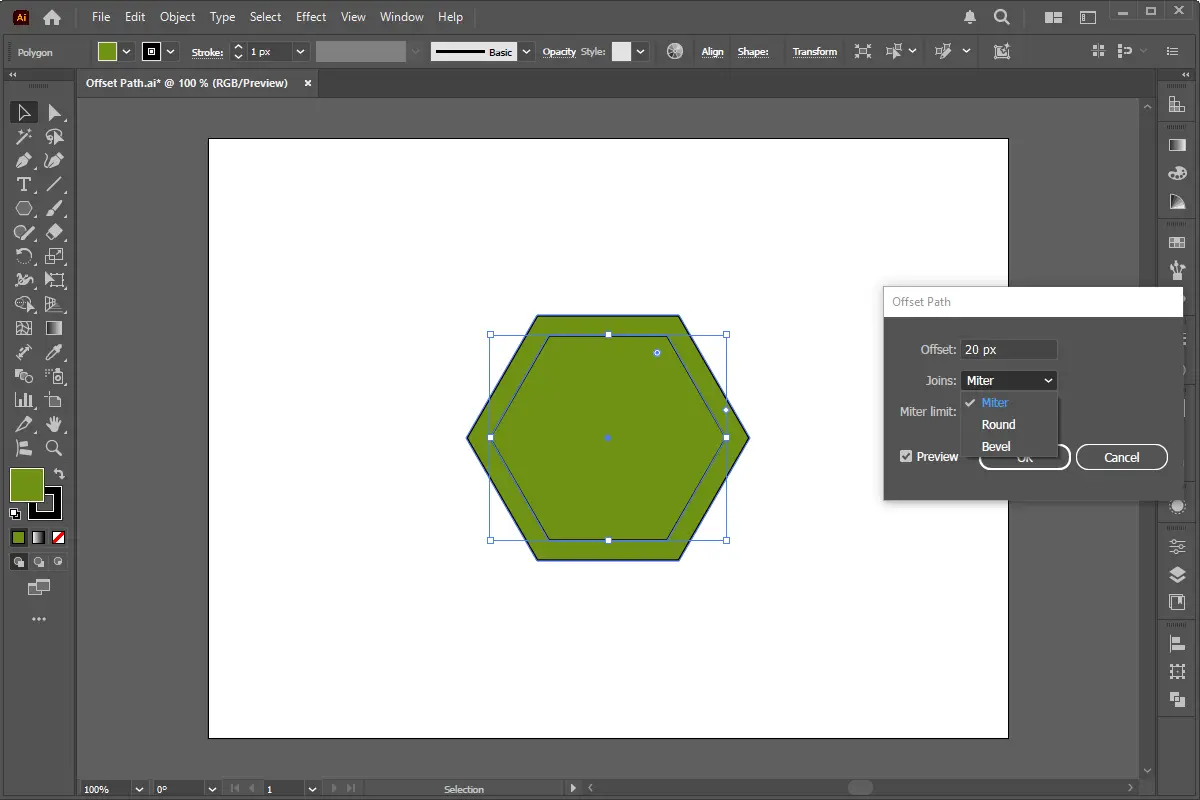
When using the Offset Path feature, you'll encounter three main options: Meter, Round, and Bevel. Each option affects the way the offset path is created, and understanding their differences is crucial to achieving the desired results. These options allow you to control the style, shape, and precision of the offset path, making them essential tools for designers working on logos, illustrations, or technical drawings.
The Meter option lets you specify the offset distance in units like points, inches, or millimeters. It provides precise control over the offset distance, making it ideal for designs requiring exact spacing. For example, in technical blueprints or layouts with consistent margins, the Meter option ensures accuracy. You can input a specific value to control how far the offset path will be from the original shape, ensuring uniformity and precision.
The Round option creates rounded corners on the offset path. This is useful for designs needing smooth, curved corners, such as logos, icons, or decorative elements. By selecting the Round option, sharp edges are softened, giving the design a polished and visually appealing look. It’s especially beneficial for organic shapes or designs aiming for a friendly and approachable aesthetic.
The Bevel option creates a beveled edge on the offset path. This is useful for designs requiring a sloping or angled edge, such as 3D graphics or technical illustrations. The Bevel option adds a chamfered effect to the corners, giving the design a dynamic and dimensional appearance. It’s effective for creating depth or mimicking real-world objects with angled edges, making it ideal for industrial or technical designs.
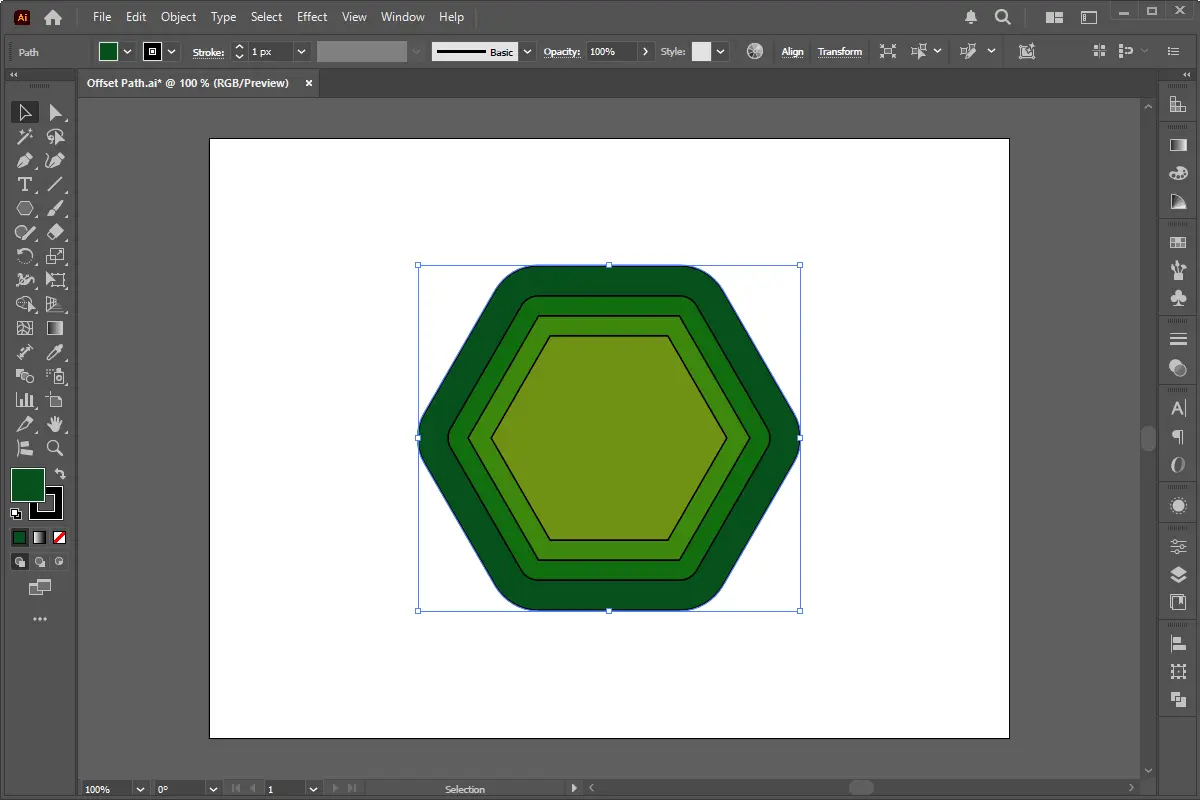
To demonstrate the Offset Path feature, let's create a simple design that showcases its capabilities.
While the basic Offset Path feature is useful, there are several advanced techniques you can use to take your designs to the next level. By mastering these methods, you can unlock greater precision, creativity, and efficiency in Adobe Illustrator.
Offset Path excels with intricate Pen tool shapes or vector illustrations. For sharp angles, adjust the Miter Limit to refine corners. Use negative offsets to hollow out shapes or create nested designs. Apply multiple offsets to the same path for layered depth, then enhance with gradient fills or variable strokes.
Merge Offset Path with Shape Builder to craft custom silhouettes. For text, offset paths and use Pathfinder > Divide to split letters for color blocking. Pair with Clipping Masks to contain offsets within boundaries. Apply offsets to Blend Objects for concentric shapes, refining them with the Width Tool for organic edges.
Enhance 3D designs by offsetting base paths before using Effect > 3D > Extrude & Bevel, creating beveled edges. Post-extrusion, offset individual faces for textures like engravings. Use gradient-filled offsets on 3D surfaces to mimic metallic reflections or etched details. Layer offsets in the Appearance Panel for materials like brushed metal.
Like any feature in Adobe Illustrator, the Offset Path feature has its advantages and disadvantages.
In conclusion, the Offset Path feature in Adobe Illustrator is a powerful tool that enables designers to create intricate and precise designs. By understanding the options and advanced techniques available, designers can unlock the full potential of this feature and take their designs to the next level. Whether you're a beginner or an experienced designer, mastering the Offset Path feature is essential for creating professional-grade designs in Adobe Illustrator.
Transferring a WordPress website to a new domain can be challenging, especially if you want to maintain your SEO rankings. Whether you're rebranding or switching to a better
HTML5 introduced the element, making it simple to embed MP4 videos directly into web pages without relying on third-party plugins like Flash. This built-in support enhances
Learn how to master the Rotate Tool in Adobe Illustrator to create stunning designs with ease. This detailed guide will cover the process of duplicating, transforming, and
PHP Output Buffering is an essential feature in PHP Web Development that helps developers manage and manipulate output before sending it to the browser. It allows capturing
Form validation is a crucial part of any web application to ensure that the submitted data is accurate, formatted correctly, and secure. While client-side validation using
HTML5 is the backbone of modern web development, providing a structured and semantic way to create web pages. However, many beginner developers unknowingly write incorrect
Adobe Illustrator is a powerful vector graphics editor that offers a wide range of tools and features to help designers create precise and visually appealing artwork. In this
Creating visually appealing and professional designs in Adobe Illustrator often hinges on precise alignment. While freehand drawing has its place, achieving pixel-perfect

Our online CSS beautifier & minifier is the professional choice for clean code. It offers customizable options for formatting, beautification, and minification. Enhance your CSS for optimal results now!

Our online HTML beautifier is the professional choice for cleaning up code. Compress & format HTML for improved structure and readability, with just a few clicks. Start beautifying today!

Design unique CSS gradients with our easy to use, professional generator. Choose colors and customize with advanced features. Lightweight for fast and optimized output!

Use our powerful sort words tool to arrange text by alphabetical order or character length. Many options available to format the output as desired. Clean up your lists now, quickly and easily!

Professional-grade text encoding and decoding is here with our advanced tool. Sophisticated features and capabilities for all your complex data transformation needs. Start now!

Our lightweight CSS filter generator lets you create CSS filters using hex values with multiple advanced options. Get the perfect look for your elements with this powerful & efficient tool!

Extract email IDs from messy text with a single click using our professional tool. Lightweight & efficient, streamlines the process for you, saving time. Try now for effortless email extraction!

Our online Lorem Ipsum generator provides the best solution for your demo content needs. It offers many options, allowing you to create perfect placeholder text with precision. Get started now!

Our Website Development Service offers custom, responsive design, ensuring seamless user experience across devices. From concept to launch, we create dynamic, SEO-friendly sites to elevate your online presence and drive engagement.

Revamp your online presence with our Website Redesign Service! We specialize in creating modern, user-friendly designs that boost engagement and conversion rates. Transform your site today for a sleek, professional look that stands out.

Transform your PSD designs into pixel-perfect, responsive HTML5 code with our professional PSD to HTML5 conversion service. Enjoy clean, SEO-friendly, and cross-browser compatible code tailored to bring your vision to life seamlessly.

Elevate your brand with our professional Logo Design Service. We create unique, memorable logos that capture your business's essence. Stand out in the market with a custom logo designed to leave a lasting impression.

Boost your site's search engine presence! We offer expert SEO solutions, including image and code enhancements, to achieve top positions on Google, Bing, and Yahoo. Let us drive qualified traffic to your business today!

Boost your brand with our Social Media Marketing Service! We specialize in crafting engaging content, driving growth through targeted ads, and maximizing your online presence. Drive growth and connect with your audience effectively.

Experience our WordPress development services, offering tailored solutions for custom themes, plugins, and seamless integrations. Enhance your online presence with our responsive, secure, and success-optimized WordPress solutions.

Enhance your website's visual appeal: We sharpen icons/images, correct RAW files & repair damaged/distorted/overly bright photos. Expect natural-colored, high-resolution JPEGs, complete with photographic effects & upscaling.

In the age of machine learning and smart algorithms, the lines between human creativity and artificial intelligence are blurring—fast. With tools like ChatGPT, Jasper, and Writesonic popping up everywhere, the content landscape is...

Boost Your SEO Rankings: Master UI Design Optimization for Higher Visibility In the digital age, SEO success isn’t just about keywords and backlinks. Google’s algorithms now prioritize user experience (UX), making your website’s User Interface...

What Are JavaScript Libraries? JavaScript libraries are pre-written collections of code that streamline complex web development tasks. They provide reusable functions, components, and utilities to handle everything from DOM manipulation to 3D rendering,...
In the dynamic world of web development, the visual appeal and user experience of a website are paramount. At the heart of this lies CSS (Cascading Style Sheets), the language that dictates how...
In today's digital landscape, a stunning and functional website is no longer a luxury but a necessity. Whether you're an aspiring web designer, a budding entrepreneur, or a seasoned professional looking to sharpen...
AI is fundamentally reshaping website development, automating tedious tasks, enabling hyper-personalization, and accelerating development cycles, which presents both immense opportunities for those who adapt and significant risks for developers who ignore this technological...

Choosing the right server infrastructure is one of the most critical decisions any business or individual with an online presence will make. Get it right, and you have a stable, performant foundation for...
In the fast-paced world of web development, efficiency and productivity are paramount. For PHP developers, the choice of a code editor can significantly impact their workflow, making the difference between a cumbersome coding...


